Most of your Snowflake bill probably doesn't need Snowflake.
In about a week I go through every query in your account, score each one by how much it actually
spilled to disk, and reconcile the totals to your invoice. You get a clear picture of what could
run on a single DuckDB machine, what should stay on Snowflake, and roughly what you'd save. It's
a fixed fee, and the scoring is open-source SQL you can read for yourself.
This is worth doing if any of this sounds familiar.
01Your Snowflake bill climbed again, and the renewal quote is already sitting in your inbox.
02You're fairly sure a lot of it is small dashboard and dbt queries that never needed a warehouse. You just can't prove it on paper.
03Finance wants the number down. You want it down without breaking a single report or carrying a new pager.
The job is to prove what's movable, in writing, before anyone touches production.
How it works
Three steps, about a week, and a number you can bring to your renewal.
01
You run our read-only export
We give you the exact SQL to run against ACCOUNT_USAGE. You run it yourself, so
we never see your credentials and nothing touches production.
02
ducklens scores every query
The open-source SQL scores each query on whether it would really fit on one machine, based on
how much it spilled to disk rather than how much it scanned. The totals reconcile to your invoice.
03
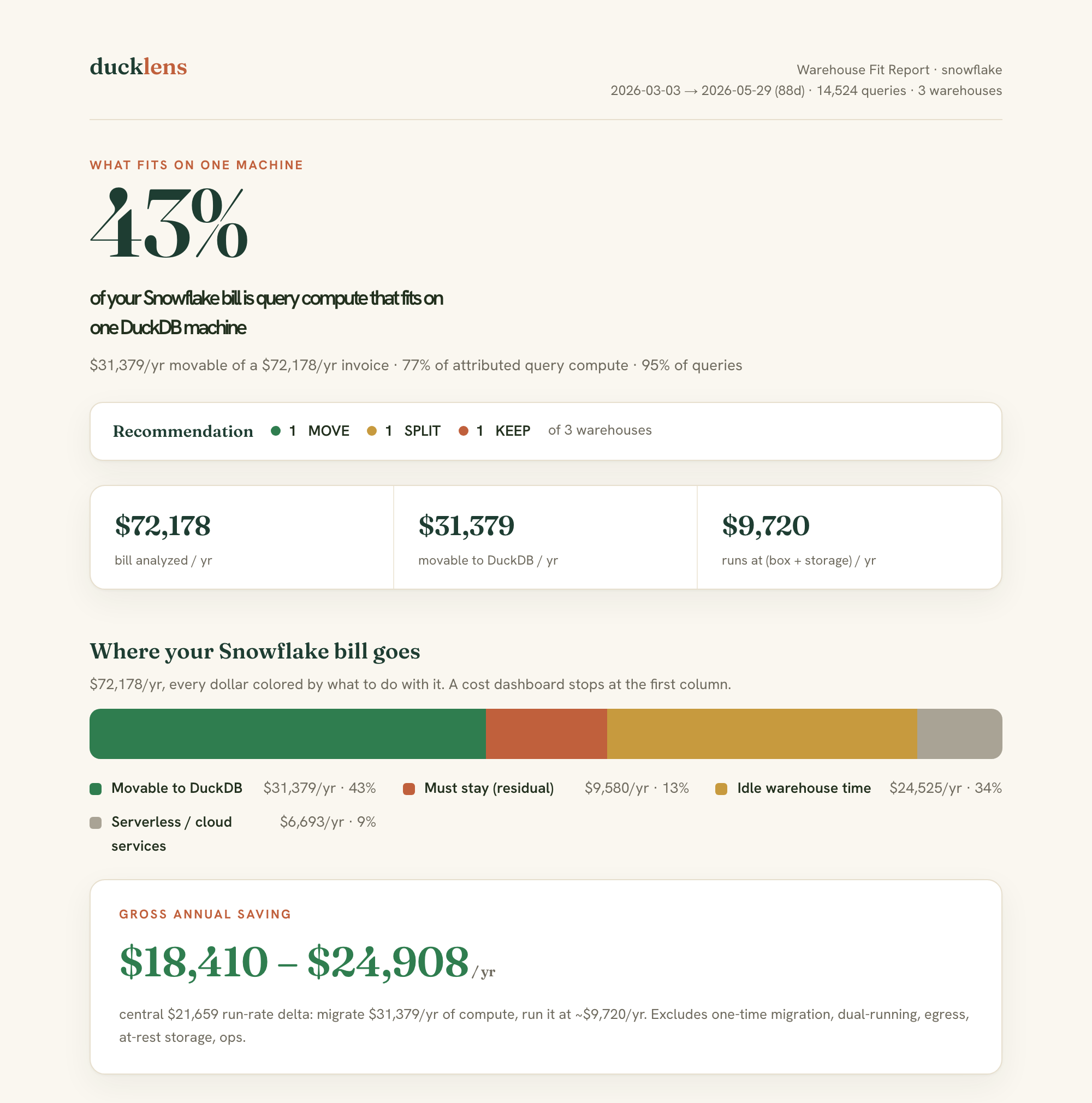
You get a one-page report
A move, split, or keep call for each warehouse, a saving range, and what a migration would
cost. Sometimes the answer is that it isn't worth it, and I'll tell you that too.
For the engineer who gets paged if it breaks
You don't have to take the numbers on faith.
You can read the scoring
Every call the tool makes comes from one SQL file you can read. The thresholds are all named
settings you can change and re-run if you disagree with one.
It's tied to your invoice
The headline number is anchored to METERING_DAILY_HISTORY, so it has to match
your Snowsight bill. If it doesn't, something is off, and you'll see where.
It tells you what to keep
Write-heavy work, high-concurrency serving, regulated data, and Snowflake-specific SQL all
stay on Snowflake. The report lists each one with the dollars attached and the reason it's staying.
Checked before anything moves
Before a single dashboard is repointed, a parallel-run check compares the old and new results
on a frozen snapshot. If one row is off, it fails.
It runs on your laptop
Your ACCOUNT_USAGE export and your credentials never leave your machine, so
there's nothing for a third party to put through a security review.
Snowflake's renewal pricing has been going up 15 to 22% a year for existing
customers. Even if you decide to stay, having a scored exit plan in hand helps in that conversation.
The offer
You start with the assessment, and only go further if the numbers justify it.
The free tool gives you a rough number on your own data. The paid assessment
gives you the version reconciled to your invoice, a clear recommendation, and someone accountable for it.
Bill read-out
$1,500 · 90 minutes
You send the export, or we run the scan together, and I walk you through your
fit report live. Credited in full against the assessment.
Assessment
from $7,500
fixed fee · ~1 week
The decision, on your real 90-day history, reconciled to your invoice.
A move, split, or keep call per warehouse
A gross saving range and payback
A straight go or no-go
If it doesn't find at least its own fee in savings, or it tells you honestly to stay, you don't pay. You keep the report either way.
Pilot recommended
$8-20k
~2-4 weeks · fixed fee
One real workload moved to DuckDB and DuckLake, checked against your data.
The parallel-run validation harness
Before and after on cost and p50 or p95
The reference stack, yours to keep
Migration
$20-50k
scoped from the pilot
We move what the assessment marked MOVE, and only that. You own the stack.
Every dashboard checked green first
A runbook and observability
The rest kept cleanly on Snowflake
The honest part
When you shouldn't migrate.
Replacing Snowflake only makes sense for working sets under about 10 TB and
under roughly 10 to 20 concurrent queries. If your workload is one of these, the assessment tells
you to keep it, in writing.
Write-heavy
Continuous MERGE and COPY, high-frequency ingestion. DuckDB is single-writer, so sustained writes hit a ceiling Snowflake doesn't have.
High-concurrency serving
Dozens of concurrent dashboard users, multi-cluster scale-out. That's a serving workload, not single-machine batch.
Regulated and federated
Strict residency, multi-engine federation, Secure Data Shares. Above about 10 TB the honest answer is often Iceberg rather than us.
You migrate the part that genuinely fits, which is often less than half, and
keep the rest. Knowing what to leave alone matters as much as knowing what to move.
How this is different
How it compares to the other cost tools.
vs savings-share optimizers
Optimizers tune your warehouses and take a cut of the savings for as long as you use them.
This looks at a different question: whether most of the bill needs a warehouse in the first place.
vs query-routing proxies
There's no proxy sitting in your query path and no new service to depend on. It's a one-time
assessment, and if you migrate, you own the result.
vs Adaptive warehouses
Adaptive Compute improves how many queries you get per dollar, but the price per credit is the
same. This shows you which of those queries would cost almost nothing on hardware you own.
vs free cost dashboards
Cost dashboards show you spend broken down by warehouse and stop there. This runs each query
against a real engine and gives you a call on it: move, split, or keep, with the dollars attached.
The deliverable
What you actually get.
You get a one-page report you can hand to your finance team, reconciled to your
invoice, with every threshold visible and the saving attached. It's the report itself, the same one
you'd forward internally.